This guide is for calendar administrators—whether you’re in IT, communications, or both—and is designed to help you get oriented to what’s new in 3.0 when you’re testing your dev site before your production upgrade. This is intended as a companion to the full 3.0+ Release Notes.
Upgrade steps and timeline
LiveWhale Calendar 2.24.0 is the last planned stable release of the 2.x line, and it’s the prerequisite for everything that follows. We won’t upgrade your dev site to 3.0 for testing until your production calendar is running 2.24.0. For those of you running auto-upgrades, that should happen automatically as soon as May 3. If you manage upgrades manually, we ask that you upgrade to 2.24.0 by August.
Once your production calendar is on 2.24.0, you’ll hear from our team with a message that includes:
We’ve upgraded your dev site to LiveWhale Calendar 3.0+ for testing
A link to a special 3.0 testing forum for reporting anything unexpected
A reminder of what customizations are worth checking
The date/time we’re holding for your production upgrade
We expect to release LiveWhale Calendar 3.0.1 or 3.0.2 to address initial bugs during testing. Upgrades will be scheduled with your institution’s theming and customization complexity in mind, so you’ll have the time you need. We’ll be hands-on for the upgrade itself, and if you need to reschedule you can let us know.
Our goal is to have everyone running LiveWhale Calendar 3+ by the end of 2026.
What’s New in 3.0
Here’s a quick orientation to the headline changes before you start exploring. Each is covered in more detail in the sections below.
For calendar managers and editors:
A refreshed UI overall
A new drafts and workflow system, including approval workflows, draft versioning of published events, and curator notifications – event submissions now arrive as drafts rather than Hidden items, giving managers a cleaner review process.
A redesigned permissions system with granular, per-user checkboxes replacing the old Editor/Publisher/Curator/Admin levels
A new Limited Visibility privacy setting, which shows events in list and widget views but requires SSO login to see certain details
New Reporting tools, including surfacing analytics traffic data being collected since version 2.23
Options to request AI suggestions for event titles and summaries when creating events
A new planning view and possible conflicts to help with event scheduling
Suggested Tags on Event Types, to help editors apply consistent tags without having to remember them
Blurbs: a new way of managing static content (welcome text, quick links, help topics) in LiveWhale Calendar
CSV imports for bulk event data entry
RSVP default changes: registration count display and custom fields are now opt-in per event rather than on by default
Images can now be organized into Shared Collections, to make it easier to curate approved images across the calendar
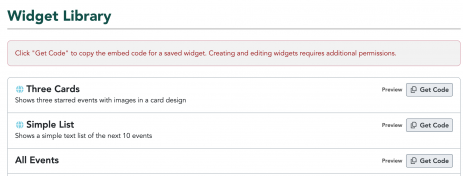
Users without widget editing capabilities can now see and Get Code for widgets including Global Widgets
A redesigned add/edit images modal with drag-and-drop uploading and per-usage ALT text customization
Past events are no longer archivable; they’re simply past events, optimized for search
For administrators and developers:
Some widget settings have been retired – not many, but worth checking if you have heavily customized widgets or theming – and others have been added
Site-wide config files are being consolidated into a single location
Some changes to how submitted events are managed (formerly “Public Submissions”)
Redirects are now available in LiveWhale Calendar
New theming options are available, including the browser-based Ingredients tool
Testing on your dev site
When our team upgrades your dev site to 3.0, here’s what we recommend familiarizing yourself with before your production upgrade window. This isn’t an exhaustive QA checklist; it’s a tour of what’s changed and what’s worth understanding before it goes live for your editors.
Back-end UI refresh
The LiveWhale Calendar back-end has a refreshed look in 3.0 – updated colors, typography, and button styles throughout. We’ve aimed for a cleaner, more modern feel while keeping things familiar for anyone who’s been using LiveWhale Calendar for a while. The layout and navigation are the same; it should feel like a fresh coat of paint rather than a new room. Take a few minutes to click around on your dev site just to get comfortable before your editors encounter it on production.
Permissions
One of the biggest structural changes in LiveWhale Calendar 3.0 is the permissions overhaul. The old bundled levels (Editor, Publisher, Curator, Administrator) have been replaced by individual per-user checkboxes. Your existing users’ permissions will carry over automatically — the new interface just gives you much more flexibility going forward.
Spend a few minutes in the Users manager to get a feel for how the new checkboxes are organized and to think about whether any of your users might benefit from a more tailored set of permissions than the old bundled levels allowed. In particular:
If you’re planning to use the new approval workflow, this is the time to identify which editors you’d like to mark as “Approval required” and who your curators will be
Anyone who previously had “Allow management of users for own group(s)?” will now have a standalone Manage users checkbox — check this at a glance to confirm it looks right
Drafts and workflow is the change most likely to be new territory for your editors, particularly if you plan to use the approval workflow. The concepts are straightforward, but getting hands-on with them on dev so you feel confident explaining them to your team is a good option.
Some things to explore:
How event drafts work and where they appear in the back-end
If you plan to use the approval workflow: walk through the full flow from an editor’s perspective and a curator’s perspective, including the “Ready for review” checkbox and the email notifications curators receive
The Pending Drafts panel in the Events manager and the Dashboard badge, which help make sure drafts don’t get forgotten
See Drafts and Workflow for a full walkthrough, which is also written to be shared directly with editors.
Submitted content
If your calendar accepts public event submissions, there’s a small but meaningful behavior change to note: submitted events now come into LiveWhale as drafts rather than Hidden items. The review and approval process is the same, but the new draft status gives managers a cleaner, more consistent workflow. Take a look at your submissions setup on dev to get a feel for how this lands for your group.
Reporting
LiveWhale 3.0 introduces a new Reporting section, giving calendar managers with reporting permissions a consolidated view of activity across all their groups. The Dashboard includes a 30-day event traffic chart, and the full Reporting tool breaks down data across five tabs: Events (including view counts), RSVPs, Submissions, Groups, and Search Keywords. Each view is filterable, sortable, and exportable as a CSV.
Administrators also have access to a System Administration page with diagnostic messages, system statistics, and a Content Health panel. It’s worth a look on dev just to get oriented; no configuration is needed. See Reporting & Analytics for full documentation.
New privacy option: Limited Visibility
3.0 introduces a new Limited Visibility privacy setting that sits between fully public and fully private. Events with this setting appear normally in calendar list and widget views, but certain details—by default, location, online registration info, and the RSVP form—require SSO login to see. Check your dev site to decide whether it’s useful for your institution, and if so, which events or groups might benefit from it. See Privacy Options for more about Limited Visibility.
AI suggestions
AI suggestions is a brand-new feature in 3.0. When editing an event, editors will see suggestions for fields like the event description. Your dev site is a great place to get a feel for the quality and tone of suggestions in the context of your institution’s events before it’s live for everyone.
See AI Suggestions for a full walkthrough of how the feature works and customization options.
Blurbs
Blurbs are a long-time feature of LiveWhale CMS that’s making its debut in LiveWhale Calendar in 3.0. They’re small pieces of static content — things like welcome messages or sidebar quick links — that calendar editors can manage directly in the back-end without any code changes. Get a first look at your dev site on what they can do and whether they’d be useful for your calendar. See Using Blurbs in LiveWhale Calendar for a full overview, or Help Topics for the use case of internal documentation.
CSV imports
LiveWhale has always supported some CSV importing, but 3.0 introduces a much more flexible and full-featured import tool covering events, files, groups, locations, users, and blurbs. If you’ve used CSV importing in 2.x, you’ll find this version considerably more capable—with auto-mapping of column headers, per-column field mapping, validation previews before committing any data, and background processing so you can leave the page while an import runs.
Consider exploring on your dev site, especially if you manage large numbers of events or are migrating data from another system. The import tool also supports bringing in cross-listed events across multiple groups in a single CSV. See CSV Imports for full documentation, including field references for each content type.
Suggested tags
Event Types can now have Suggested Tags associated with them, which appear as editor suggestions when adding or editing an event. This is a nice consistency tool, as editors don’t have to remember which tags apply to which kinds of events. Take a look at your Event Types on dev to see whether adding suggested tags would be useful for your groups. See Suggested Tags for instructions on configuring and using this new option.
RSVP updates
If you run events with registrations, a couple of RSVP defaults have changed in 3.0:
Registration count display is now opt-in per event, rather than shown by default on all events with a maximum attendee count
Custom RSVP fields are now disabled by default on new events, and need to be enabled on a per-event basis (or set to default-enabled in your PHP configuration if you prefer the old behavior)
Neither of these is a breaking change, but if your editors are used to these appearing automatically, it’s more of a heads-up. LiveWhale Calendar 3.1 also includes new optional email notifications for canceling and deleting RSVP events.
Shared Image Collections
3.0 introduces Shared Collections: a way for users with the appropriate permission to mark any of their image collections as shared, making those images available to editors across your entire LiveWhale installation when adding images to their content.
This replaces the per-image sharing available in LiveWhale 2.x – please note, individual images are no longer shareable in 3.0, and the shared-image flag will not carry over during the upgrade. Images already attached to events will not be affected, but the “Shared Images” tab has been removed in 3.0. If your calendar managers have been using Shared Images, we strongly recommend adding your approved images to one or more collections before upgrading, so you can mark those collections as Shared once you’re on 3.0. See Images & Collections for full documentation.
Widget access for non-editors
Starting in 3.1.0, widgets (with “Get Code” embed links) are now visible under Toolbox > Widgets to all of a group’s calendar managers, not just those with widget-editing permission. Admins can also setup Global Widgets that show for everyone with the &group= parameter auto-added.
Image modal
The “add/edit images” modal has been redesigned and now allows editors to customize ALT text per usage of an image, rather than just once per uploaded image. ALT text set at upload time will still be there as a starting point, and editors can now refine it for each specific event context.
This is a meaningful accessibility improvement and is worth a quick look so you can speak to it when training your team. The updated modal also has a refreshed design and an easy drag-and-drop uploader.
For Administrators and Developers
Retired widget settings
A handful of widget settings have been removed in 3.0. These aren’t super common, but if your theming or embedded widgets use any of them, they’ll need updating. Searching your theme files and custom widget embeds for the following would be useful:
Retired settings:
item_url
(hidden in the UI for now, but will be fully removed in a future upgrade — we’d recommend updating sooner rather than later)
columns
slideshow
slideshow_interval
slideshow_no_pausing
list_order
theme
use_tag_classes
use_category_classes
The columns and slideshow options have mostly been replaced with custom HTML formatting on your widgets, rather than relaying on LiveWhale-provided markup or scripts.
Replaced settings:
show_rss_link
and
show_ical_link
have been replaced with
rss_link
and
ical_link
options on the
format_widget
wrapper. Any widgets using the old options should be updated.
New widget options
show_today_on_ongoing_events
By default, widgets display the original start date of a multi-day event that is currently in progress. Sometimes this causes confusion for long-running events like art exhibititions. In 3.0, setting
show_today_on_ongoing_events
to
true
causes the widget to display today’s date instead for any ongoing event. This keeps those listings feeling current without requiring workarounds like a large repeating daily event series.
show_calendar_link
It’s always been possible to add a “View full calendar” or “View more events” link to your widgets by hard-coding it into your widget format. In 3.0, this can be done more dynamically using the new
show_calendar_link
option. You can include it conditionally in your
format_widget
wrapper, and then customize the link destination per placement — so the same widget template might link to
/admissions
on one page and
/athletics
on another, just by passing
&show_calendar_link=/athletics
when you embed it.
CSS styles
Widgets have two new styling options in 3.0, for situations where your existing on-page CSS doesn’t quite cover everything:
Pre-built stylesheets — place
.css
,
.less
, or
.scss
files in
/_ingredients/templates/resources/
and they’ll appear in a dropdown in the widget editor. Selecting one will inject it alongside the widget on your pages.
Free-form CSS field — a new CSS field in the widget editor lets you write styles directly. These are automatically namespaced to only affect that widget, so there’s no risk of bleeding into other elements on the page.
As part of these changes, we’re no longer bundling _i/themes/global/styles/widgets.(css/less/scss) with every widget. You can still have an all-in-one file if you prefer by moving it into _i/templates/resources/ and adding it to your default widget template, but we imagine more people will start using smaller CSS sets if at all and attaching them to individual templates or widgets.
The best practice is still to style widgets using your on-page CSS by matching HTML tags and classes — but these options make it much easier to handle edge cases without a full theming change.
Config file consolidation
In 3.0, the three site-wide client/ config files (public, private, and global) are being consolidated into one client.config.php.
The old file locations will still be checked for backwards compatibility, so nothing will break – but admins will see a dashboard notice prompting migration. We can help handle the reorganization as part of the upgrade process if we spot it, but it’s good context to have if you’re doing any config work during the testing period.
New feature: Redirects
Redirects have been available in LiveWhale CMS for a while, and in 3.0 they’re coming to LiveWhale Calendar. If you’ve been managing calendar URL redirects outside of LiveWhale, this is worth exploring as a more integrated alternative. You can also now edit existing redirects via the manager, which is new for CMS users as well.
The Ingredients Tool
The Ingredients tool is a new browser-based editor that lets authorized users browse, edit, preview, and publish theme files (HTML includes, stylesheets, scripts, and components) without needing SFTP access or a local code editor. Changes are organized into named versions that can be live-previewed on your calendar before publishing. Access is granted per user by a LiveWhale administrator. See the Ingredients tool guide for a full walkthrough.
New theming options
Depending on how customized your calendar is, 3.0 introduces a number of new theming options. A few highlights:
View-specific event components – you can now theme event listings separately for each calendar view (day, week, all events, search results) using dedicated template files, rather than relying on a single shared component
Custom Field filters – you can now add Custom Field filters to your front-end calendar theme
Calendar filters are now rendered as dropdowns in core calendar components, with an automatic type-to-filter input for long lists
Pagination is now themeable with its own component
RSVP form markup has changed from a table to divs – if you’ve customized RSVP form styling, review this on dev
We want the upgrade process to go smoothly for everyone, so here’s a clear picture of who handles what when something comes up during testing.
Our responsibilities:
Scheduling and executing your dev and production upgrades
Addressing core bugs found during 3.0 testing – we’ll be using the 3.0 testing forum for that
Providing documentation of new features and changes (you’re reading it!)
Your responsibilities:
Upgrading your production site to 2.24.0 if you’re not on auto-upgrades
Testing your dev site and flagging anything unexpected
Addressing any issues specific to your own theming and customizations*
* As always, our SLA says that you own client-specific code (e.g., customizations to your theming in /_ingredients/ and any module code in /livewhale/client/modules). That being said, you’re not on your own—if you run into something with your theming or customizations that you need help updating for 3.0+, we’re always available via the Request Help Form or via Personalized Email Support.
 LiveWhale Support